How to Stay on Top of Recurring Cleaning Jobs
Recurring cleaning work is easy to underestimate until every customer has a different rhythm. Here is how a flexible recurring cleaning schedule keeps future visits under control.
A cleaning company rarely has one simple schedule. One customer needs cleaning every Monday. Another wants every second Tuesday. A third has monthly cleaning, while a fourth only needs visits on specific weekdays.
At first, it may feel manageable to keep those agreements in your head or create each future visit by hand. But as the number of customers and employees grows, recurring work needs to be treated as a real schedule, not as a collection of individual visits.
Manual planning gets heavy fast
Creating every recurring cleaning visit manually sounds harmless when there are only a few customers. In practice, it creates the kind of small administrative burden that grows quietly.
You repeat the same data entry. You have to remember future visits weeks or months ahead. It becomes harder to see whether next week is already full. When a customer changes their agreement, the change has to be reflected everywhere. Holidays, vacations, and temporary closures add another layer of cleanup.
None of this is dramatic on its own. The problem is that cleaning business scheduling depends on many small commitments being correct at the same time.
Define the customer’s schedule once
A better approach is to define the customer’s recurring cleaning schedule once and let that schedule become the source for future visits.
That could be as simple as:
- Every Monday
- Every second Tuesday
- Every month
Instead of creating each visit one by one, the business describes the agreement. The scheduling system then turns that agreement into the visits that need to appear in the calendar.
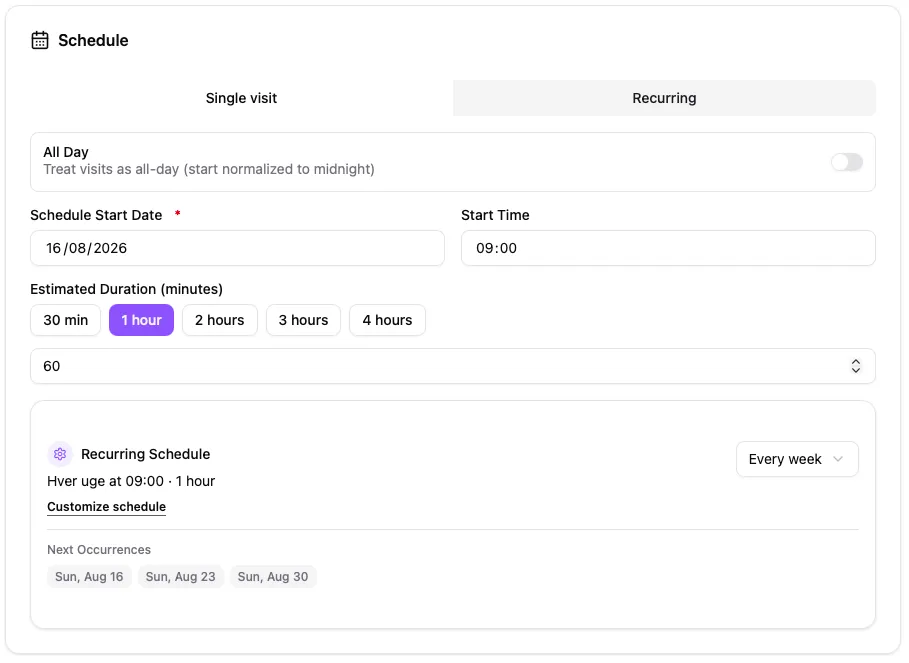
A recurring schedule turns the customer agreement into upcoming visits.
Recurring work is not always weekly
Many customer agreements are weekly, but not all of them. Cleaning businesses often need to handle jobs every 2 weeks, every 3 weeks, every 4 weeks, on weekdays, monthly, or on a more customer-specific rhythm.
This is where flexible recurrence matters. Simple schedules should be quick to set up. More complicated customer agreements should not force you into a workaround.
CleanTracker includes predefined choices for common recurring cleaning jobs, such as weekly, every second week, every third week, every fourth week, weekdays, and monthly schedules. The point is not just faster setup. It is also operational clarity: the schedule says what the customer actually bought, and the calendar follows that plan.
Some agreements need more flexibility
Real customer agreements do not always fit neatly into one preset. A customer may have a pattern that is easy to explain in the contract but awkward to manage manually.
For those cases, CleanTracker also supports custom recurring schedules, including multiple schedule rules in the same job. That makes it possible to represent a more specialized agreement without approximating it by hand each month.
The important idea is simple: the system should adapt to the agreement. The business should not have to reshape the agreement just because the scheduling tool only understands one pattern.
Exceptions are part of the schedule
Recurring work still has real-world interruptions. A customer may be closed for a holiday. An office may pause cleaning during vacation. A location may have a temporary closure.
If those dates are handled only after visits have been created, the team has to clean up the calendar manually. CleanTracker allows specific dates to be excluded from the recurring schedule, so the exception is part of the plan from the start.
That matters because exceptions are not unusual. They are part of running recurring service work well.
You should be able to see what is coming
Before applying a recurring schedule, CleanTracker shows upcoming visits. This preview helps catch the simple mistakes that can otherwise become calendar problems: the wrong weekday, the wrong interval, or an exception that was missed.
The more specialized the customer schedule is, the more valuable that preview becomes. It gives the planner a chance to verify the result before the schedule becomes actual work for the team.
From customer agreement to working calendar
A recurring schedule is useful because it feeds the day-to-day planning process:
Customer agreement -> recurring schedule -> generated visits -> calendar -> team execution.
Once the job is saved in CleanTracker, the relevant visits are created and appear in the calendar alongside the company’s other work. The office can see what is coming, and the team has a clearer calendar to work from.
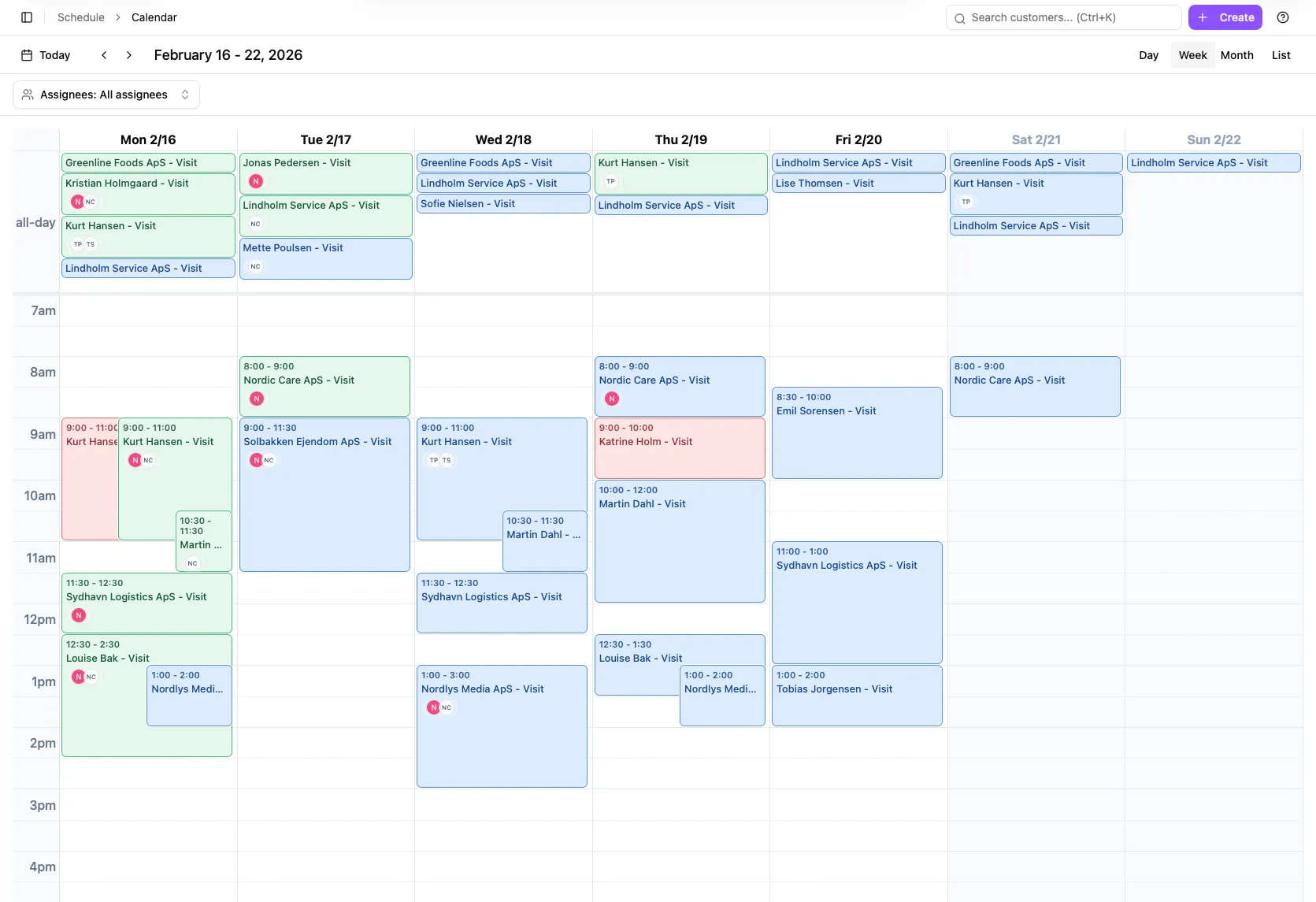
Generated visits appear in the working calendar with the rest of the team’s schedule.
A practical example
A cleaning company has a customer who wants cleaning every second Tuesday. The company defines that recurring schedule once. CleanTracker then creates the upcoming visits, which appear in the calendar together with the company’s other jobs.
For a more specialized customer, the planner can use a custom schedule instead of manually creating future visits or relying on a pattern that does not quite match the agreement.
CleanTracker’s approach to recurring work
CleanTracker supports recurring schedules for both simple and more advanced customer agreements. Common patterns can be selected quickly, while custom scheduling handles requirements that do not fit a standard rhythm.
That combination is deliberate: simple recurring cleaning jobs should be fast to configure, and more unusual customer agreements should still be possible to manage without workaround scheduling.
Want to see how to set up a recurring schedule in CleanTracker? See our step-by-step guide.
Start free with CleanTracker. Create your free account.